Canva makes Affinity software suite free
Canva makes Affinity free.
Having used Affinity photo for near on 5 years now. I am always pleased with the results I can achieve. Largely taking the place of Adobe products since the introduction of their Creative Cloud feature without the monthly payment. After hearing of the producing company’s (Serif) purchase by Canva; I was unsure what that meant for the future of one of my favorite editors. It is hard to keep creating files in a different format in a program that may be no longer supported moving forward.
Canva has collected the entire Affinity suite ( Affinity Photo 2, Designer 2, and Publisher 2) into a single application and offered it for free. The caveat, being that it comes with integration to Canva and requires a Canva account. With the most advanced features including much of the AI features locked behind the Canva premium paywall.
With that being said even without the paid for features it is still a powerful suite of tools.
Affinity Photo 2
This survives largely in tact. The program interface changes quite a bit because all of Affinity’s programs are integrated in a tabbed fashion. Tabs switch between the pixel editor (Photo), vector editor (Designer) and layout tools (Publisher) within the app.
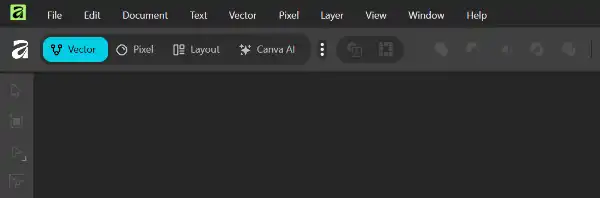
Photo retains all the features that I enjoy so much about using it. While I have not used it on every photo, I am always thankful to have a tool like this one. Paying monthly for features that may go unused for months at a time never sits well with me.
The RAW converter is competent, layers work well. It is fairly demanding of hardware particularly the RAM depending on the size of the images you are working with. The object selection tool within images is surprisingly not locked behind the Canva paywall. Reserving that for the broad library of assets maintained by Canva and the image generation AI.
I had not previously ventured too deeply into the Designer software or the Publisher, but they seem full featured for Vector graphic design and layout/publishing respectively.
A noteworthy addition to the free software space for now, particularly collected into a suite to seamlessly move from pixel edits, add vector elements then move to the design space to finish and export publish ready content.
Since it is free now, and only requires a Canva account check it out here